

By Keertan Zala, Head of Product Management, Motadata
For many online retailers, the last weeks of November are an
important trading period. Adobe
expects US shoppers to spend a record $275.1 billion online between
November 1 and December 31, 2026, up 6.7% on last year. Cyber Monday
alone is forecast at $15.1 billion.
That same demand can put unusually high loads on your website, mobile
app and payment systems. A checkout that slows down on a quiet Tuesday
costs a few orders. The same slowdown on Black Friday morning costs part
of your most valuable trading day, and shoppers who give up may finish
their purchase with a competitor.
Keeping systems running through peak season comes down to three
things. You need to know what tends to break first under load, see
problems from the shopper’s side before complaints arrive, and have a
clear plan for when something fails in the middle of a sale.
Why
Does Peak Season Put So Much Pressure on Retail Systems?
Peak season packs a large share of annual demand into a few days.
Adobe forecasts $47.5 billion in US online sales across Cyber Week, the
five days from Thanksgiving to Cyber Monday. That is 17.3% of the entire
two-month season in less than a week.
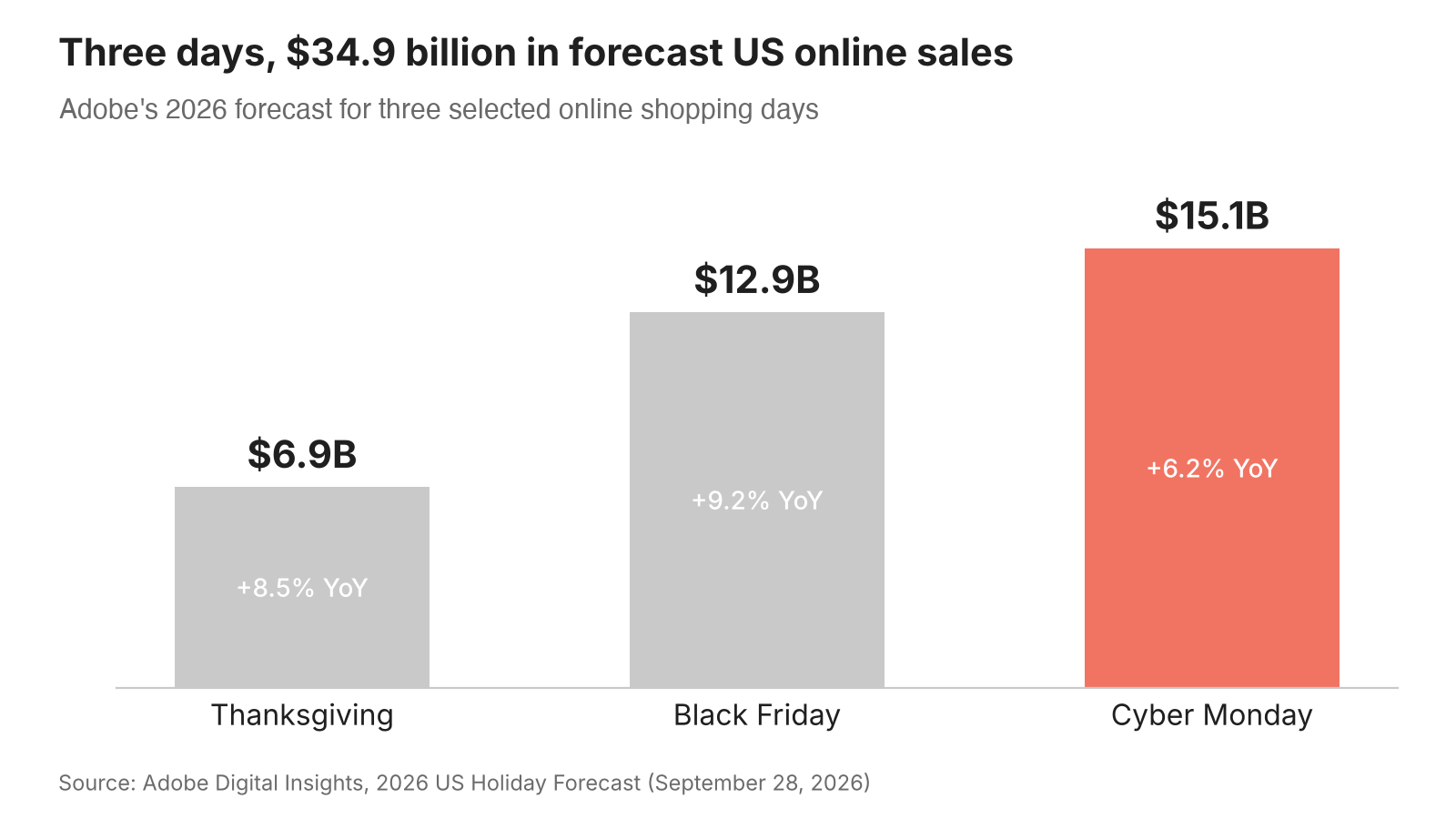
Figure 1: Adobe’s 2026 forecast for three US online shopping
days.
Several other shifts add to the load:
-
Mobile spending is substantial. Adobe expects a
record 63% of Thanksgiving online spend to come from mobile devices.
Heavy pages and scripts can load slowly on mobile devices, especially on
slower connections. -
AI tools now send shoppers. Adobe projects
traffic from AI chat and browser services to US retail sites to grow
130% year over year this season. Shoppers referred by AI tools may land
on different pages, at different times, than your past traffic data
suggests. -
Bots compete with buyers. Radware’s
2026 E-Commerce Bot Threat Report found that malicious bots made up
43% of traffic at the e-commerce retailers Radware protected during the
five days from Thanksgiving through Cyber Monday in 2025, close to the
46% from human shoppers. Bot requests that reach your systems can use
resources your customers also need. -
Payments run through more providers. Adobe
expects buy now, pay later options to drive $21.3 billion in holiday
spend. Each payment option adds another outside service your checkout
depends on.
Promotions also start at fixed times, so traffic does not build
gradually. It jumps the moment an email lands or a deal goes live.
What Tends to
Break First When Traffic Spikes?
Problems can start deeper in the purchase path, where one shopper
action triggers many requests across several systems.
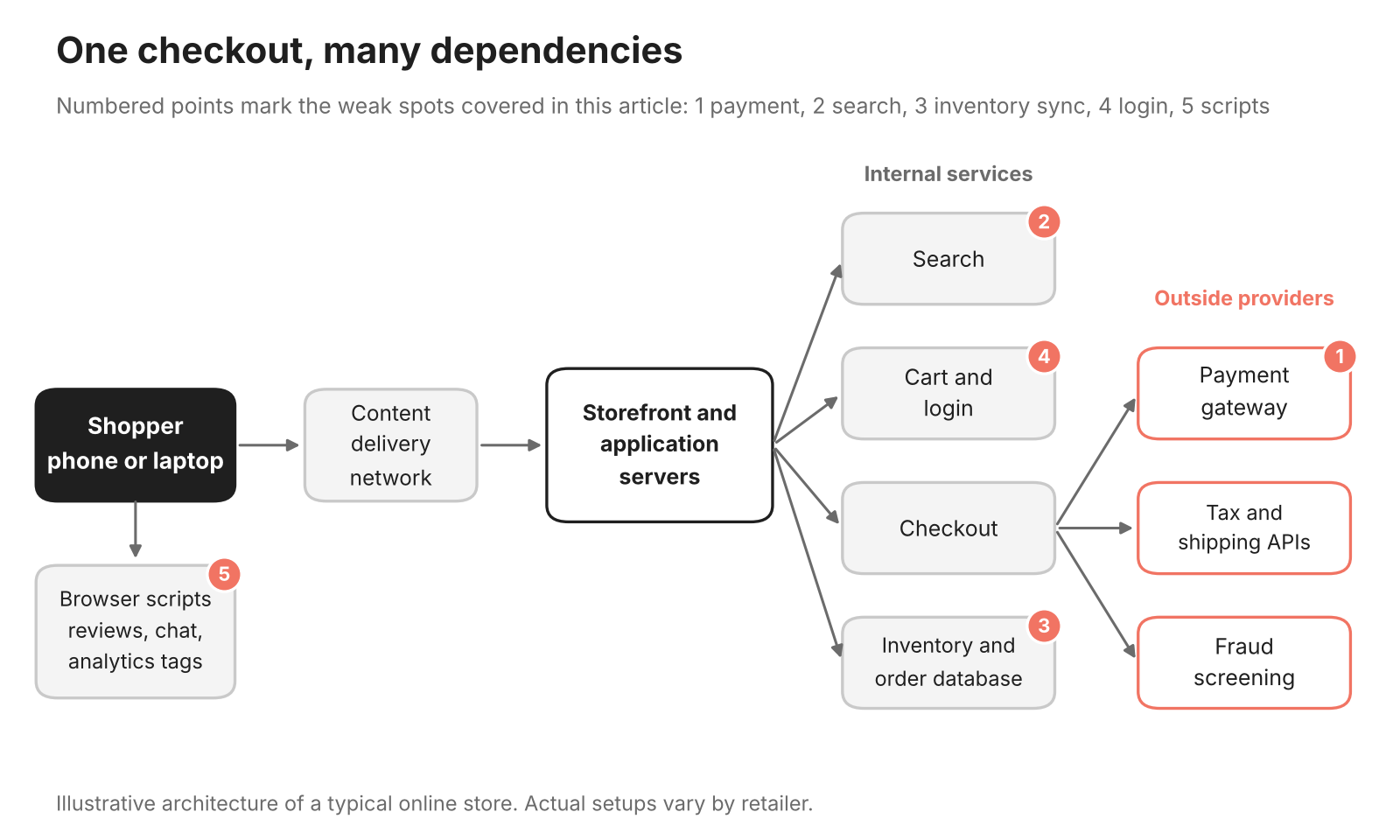
Figure 2: A single checkout depends on several internal and
outside services.
These are the weak points retailers see most often under peak
load:
-
Checkout and payment. Checkout calls tax,
shipping, fraud screening and payment services in a short sequence. If
any one of them responds slowly, the whole step stalls and the shopper
sees a spinning button. -
Search and product pages. Search queries and
stock lookups hit the database far more often during a sale. Queries
that run fine in October can queue up when thousands of shoppers filter
the same category at once. -
Inventory and order sync. When the storefront
and the inventory system fall out of step, you risk selling items you no
longer have, which turns into cancellations and support tickets
later. -
Login and accounts. Login pages attract
automated attacks during big sales. Imperva
reported that bot attacks on retail sites on Black Friday 2025 rose
50% above the November average. -
Third-party scripts. Review widgets, chat tools,
analytics tags and personalization scripts all load in the shopper’s
browser. A slow or blocking script can delay parts of a page, even when
your own servers are healthy.
Outside providers matter as much as your own systems. Uptime
Institute’s 2026 outage analysis notes that third-party IT and data
center providers, including cloud, internet and telecom companies,
accounted for about two-thirds of the publicly reported outages it
tracked over nine years. Your site can be fully up while a provider it
relies on is not.
How Much Does a
Slow Page Cost During a Sale?
Small delays can affect revenue. In the Milliseconds
Make Millions study, commissioned by Google and run by 55 and
Deloitte across 37 brand sites, a 0.1-second improvement across four
mobile speed measures throughout the customer journey was associated
with 8.4% higher retail conversion rates. Average order value was 9.2%
higher in the study. These results do not guarantee the same gains for
every retailer.
Most carts never become orders, and some of the reasons sit with the
retailer’s systems rather than the shopper. Baymard
Institute puts the average documented cart abandonment rate at
70.22% across 50 studies. Among US shoppers who abandoned for a reason
other than browsing, 17% said the website had errors or crashed.
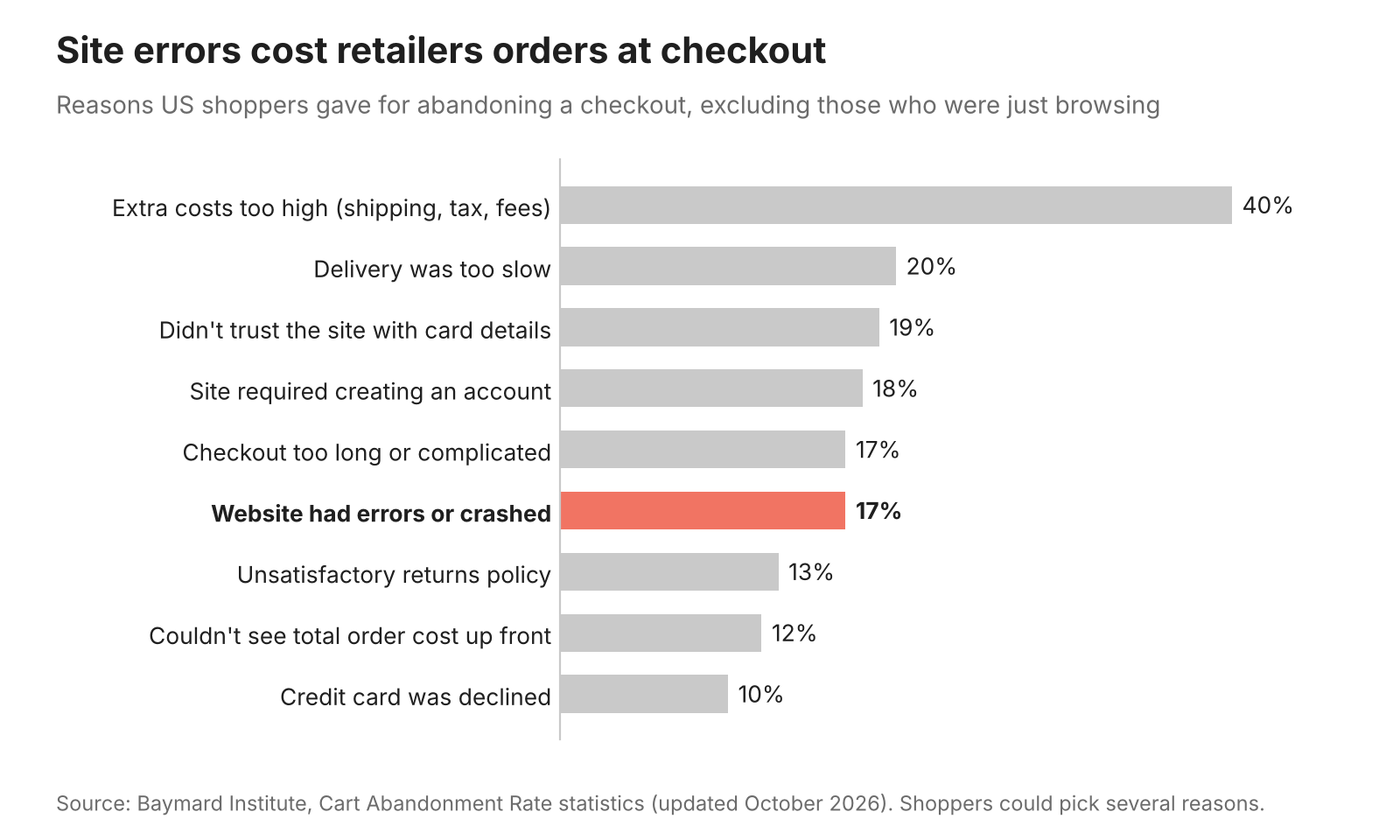
Figure 3: Site errors are among the leading reasons shoppers
abandon a checkout.
A full outage costs more again. In Uptime Institute’s 2025 survey,
57% of the surveyed operators who reported a significant outage said it
cost more than $100,000, and one in five put the cost above $1 million.
During peak season, the same minutes of downtime land on your
highest-value traffic.
It also helps to measure speed the way search engines and shoppers
judge it. Google’s Core Web
Vitals track loading, responsiveness and visual stability, and
Google assesses them at the 75th percentile of visits. An average load
time can look healthy while one in four shoppers waits far longer.
What
Should Retailers Monitor Before and During Peak Season?
Server health alone will not tell you whether customers can buy. You
need a view that starts with the shopper and works back through each
system behind the page. Five layers cover most of what matters:
-
Shopper experience. Track page load times, Core
Web Vitals, JavaScript errors and drop-off at each checkout step, split
by device, browser and region. This is where problems show up first,
often before any server alert fires. -
Application performance. Watch response times
and error rates for the services behind cart, search, checkout and
login. When a page slows down, tracing the request shows which service
or database query caused it. -
Infrastructure. Keep an eye on servers,
containers, databases, network links and content delivery. The key
question is headroom: how close each component is to its limit as
traffic climbs. -
Third-party services. Measure response time and
success rate for payment gateways, tax, shipping and fraud services.
Their slowdowns look like your slowdowns to the shopper. -
Business signals. Orders per minute, payment
success rate and add-to-cart rate often reveal trouble when every
technical dashboard still looks normal.
The value comes from connecting these layers. A drop in conversions
means little until you can tie it to a slow payment call or a failing
script. Real user monitoring can record page performance and JavaScript
errors from shoppers’ browsers. When that data is connected with
checkout analytics and backend traces, your team can investigate the
cause of a slowdown.
How Can Teams
Prepare Before the Traffic Arrives?
Many peak-season failures can be found weeks in advance if you test
the right paths. Preparation works best as a sequence that ends with a
quiet, stable site in the final days before the sale.
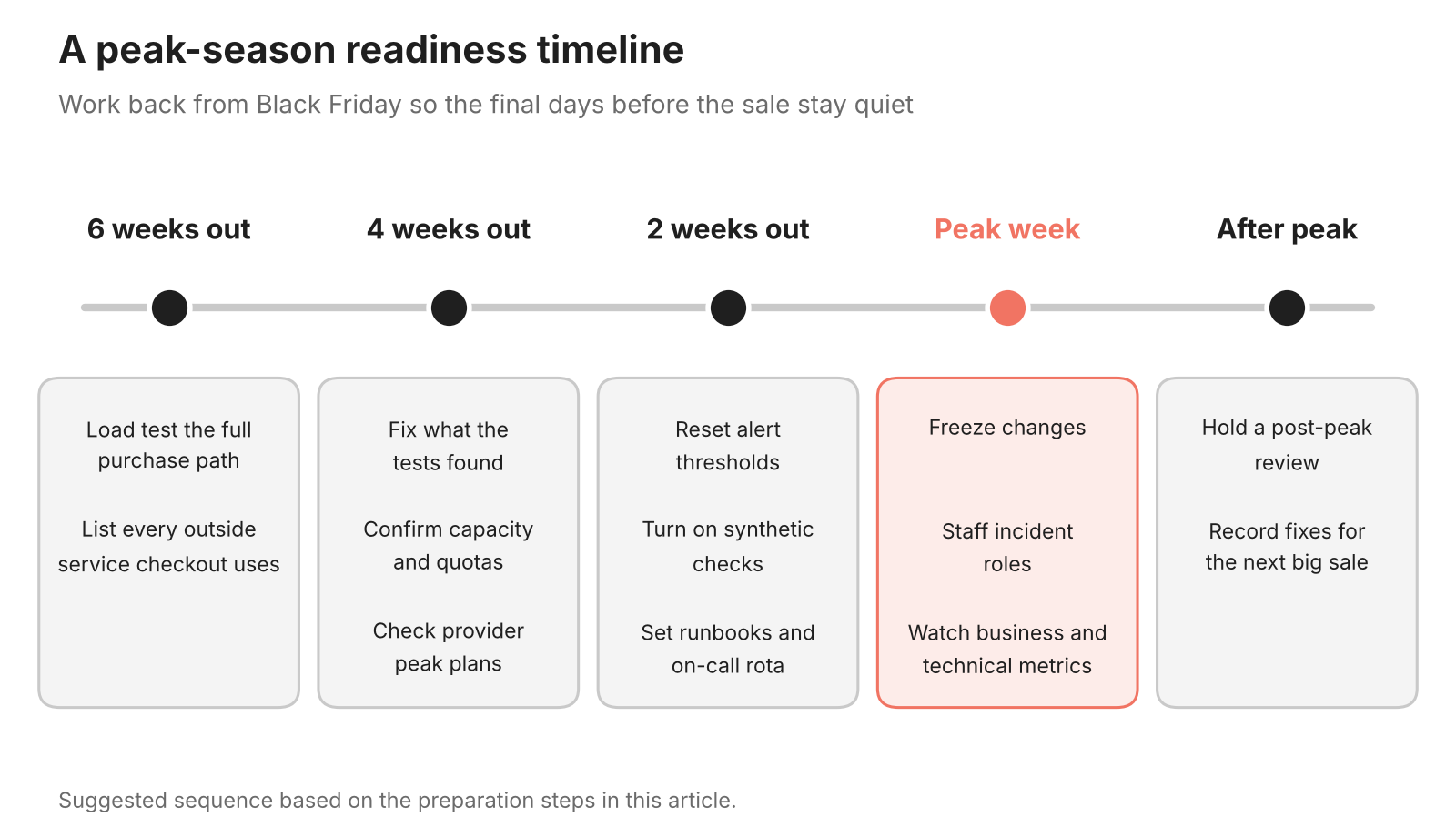
Figure 4: A simple readiness timeline for the weeks before peak
trading.
-
Load test the full purchase path. Test search,
product pages, cart, login and checkout together, at a level above last
year’s peak. Include the calls to payment and shipping services, or
stand-ins that respond with realistic delays. -
Run scripted checks on key journeys. Synthetic
monitoring can run scripted checkout checks every few minutes from
several locations, helping you detect a broken checkout. Use test or
sandbox transactions where appropriate to avoid unintended charges,
orders or inventory changes. -
Reset alert thresholds for peak volumes.
Thresholds tuned for October will either fire constantly or miss a
slowdown that matters at peak volumes. Add alerts on orders per minute
and payment success rate. -
Confirm capacity limits. Check autoscaling caps,
cloud account quotas, database connection limits and CDN settings. A
limit nobody remembered setting can stop growth in the middle of a
sale. -
Freeze changes. Uptime Institute reports that
failure to follow established procedures remains the leading driver of
outages caused by human error. Limit releases during the peak window and
keep a tested rollback ready for anything that must ship. -
Talk to your providers. Ask your payment,
hosting and delivery partners how they plan for peak, where they post
status updates and who to call when something goes wrong.
What Should
Happen When Something Fails Mid-Sale?
Even well-prepared retailers have incidents during peak season. What
separates a short disruption from a lost day is how quickly the right
people act on the right information.
-
Name owners before the sale starts. Agree who
leads an incident, who speaks to customers and who owns each critical
service. Decisions made at 2 a.m. under pressure are slower and riskier
than decisions made in advance. -
Protect the checkout first. Plan which features
you can switch off to keep orders flowing, such as product
recommendations, review widgets or live chat. Shoppers will accept a
simpler page more readily than a checkout that fails. -
Turn alerts into incidents automatically.
Connect your monitoring to your service desk so a serious alert opens an
incident with the affected service, recent changes and current metrics
attached. Your team spends the first minutes fixing, not gathering
context. -
Tell customers what is happening. A short
banner, a status update or a prepared support reply reduces repeat
contacts and keeps trust while you work on a fix. -
Review after the peak. Hold a short review once
traffic settles, while details are fresh. Record what failed, how it was
found and what you will change before the next major sale.
Conclusion
Peak season rewards retailers whose systems stay fast and available
when demand is at its highest. The spending forecasts are strong, but
slow pages, failed payments and checkout crashes can send some of that
demand elsewhere.
The work is not complicated, but it has to start early. Test the full
purchase path under load, monitor from the shopper’s side as well as the
server side, connect alerts to a clear incident process and keep changes
to a minimum during the busiest days. Retailers that do this go into
Black Friday knowing where their weak points are, instead of finding
them during the sale.
About the Author
Keertan Zala is
Head of Product Management at Motadata, where he leads the team
behind the company’s observability and IT service management platforms.
He has worked at Motadata as a Product Manager and Senior Product
Analyst, and speaks at industry events and webinars on keeping
business-critical systems available.

